How to Get Early Access to Seedance 2.0 + Useful Prompts Tips!
Seedance 2.0 is ByteDance’s (TikTok) new AI video model. It hasn’t been officially released yet, but reports indicate it will be officially released on February 24th. Many beta testers have been amazed by its actual output, with many praising it as surpassing Sora 2 and Veo 3.1. Some users are eager to try it, but don’t know where to do so. This article introduces how to early access to Seedance 2.0.
How to Access Seedance 2.0 Early?
Way 1: Via Dreamina Official Platform
How to access Seedance 2.0 early on the web? The first platform for you is the Dreamina official website. Follow the steps below:
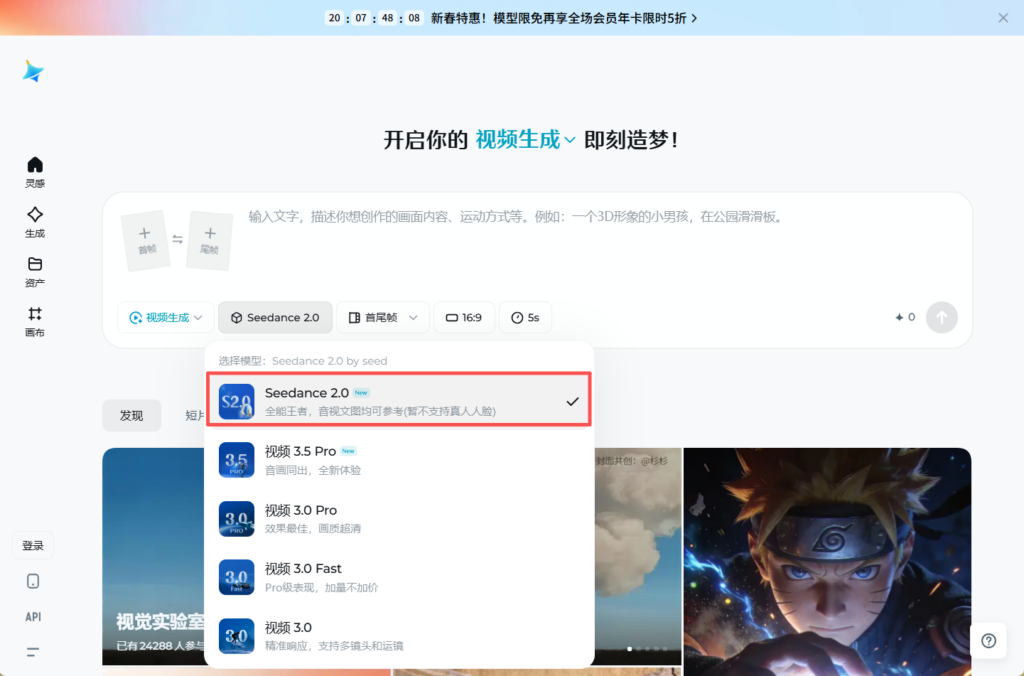
Step 1: Go to https://jimeng.jianying.com/ and log into with your Douyin account.
Step 2: Go to the Generate section and choose Video Generate. Click the dropdown menu to select Seedance 2.0.
Way 2: Via Volcengine Platform
The second method for you to try Seedance 2.0 is via the Volcengine platform. New users/trial users can currently enjoy 8 free 15-second high-quality video generation sessions (1080P is also acceptable), with extremely fast generation speed and almost no waiting. Here are the steps:
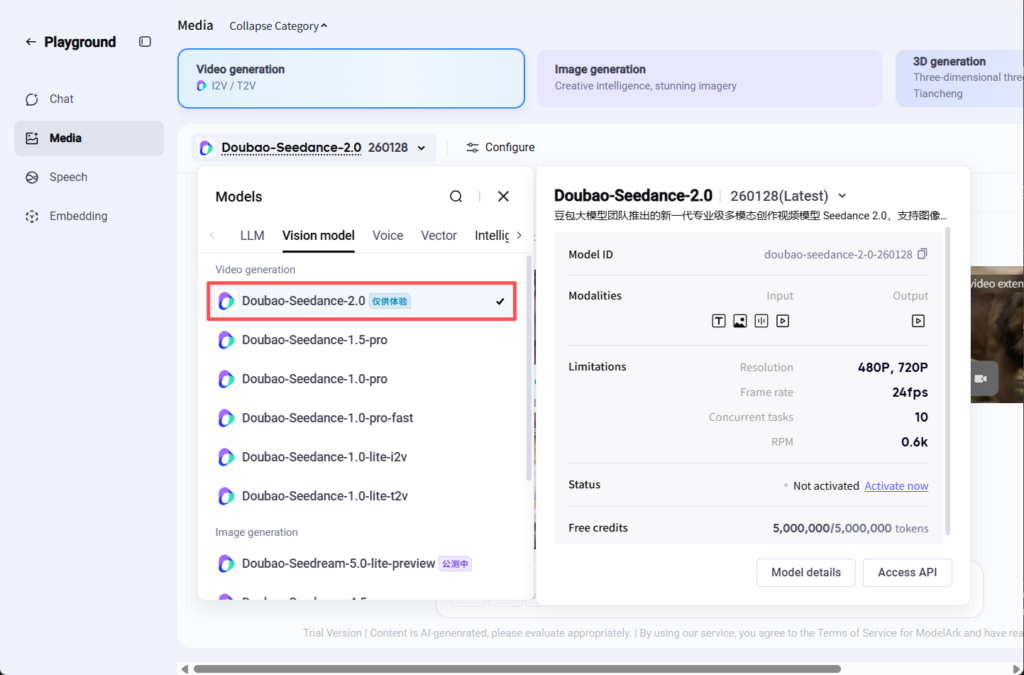
Step 1: Go to https://console.volcengine.com/ and log in to your account.
Step 2: Click the Playground section and choose the Media tab.
Step 3: Under the Video generation tab, click the drop-down menu to choose Doubao-Seedance-2.0 under Vision model.
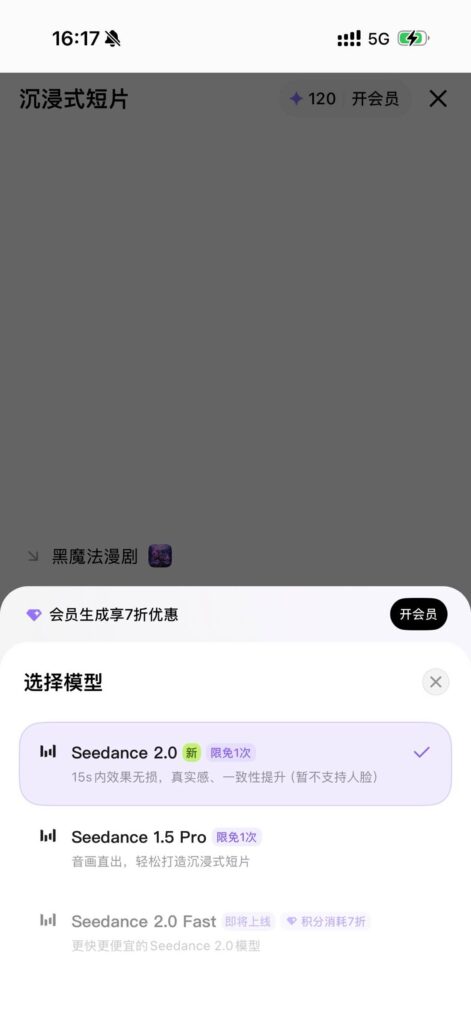
Way 3: Via Xiaoyunque APP
If you are a phone user, you can try Seedance 2.0 via the Xiaoyunque app.
Step 1: Download the Xiaoyunque app via APP Store or Google Play Store.
Step 2: Log in to your account.
Step 3: Choose Seedance 2.0.
What Can You Generate with Seedance 2.0
1. Motion + Camera Replication
You can upload a reference video and Seedance 2.0 extracts:
- choreography (fight scenes, dance moves, action)
- camera techniques (dolly shots, tracking, crane, handheld)
- editing rhythm (cut timing, transitions, pacing)
- specific moves (Hitchcock zooms, whip pans, orbit shots)
prompt example:
Reference@Image 1 for the man’s appearance in @Image 2‘s elevator setting. Fully replicate @Video 1‘s camera movements and the protagonist’s facial expressions. Hitchcock zoom when startled, then several orbit shots inside the elevator. Doors open, tracking shot following him out.
you’re stealing the cinematography from any video and applying it to your own characters and settings
2. Character Consistency
Seedance 2.0 locks:
- face identity throughout the video
- product details (logos, text, fine elements)
- environment consistency across shots
- visual style (no random style drift mid-clip)
Prompt example: @Image 1 is the main character in your prompt ensures the face stays consistent. The morphing problem is basically solved.
3. Creative Template Replication
Find a video style you like. an ad format, a transition effect, and an editing style. upload it as a reference and generate new content in that exact format.
Find a video, feed it as @Video 1, and swap in your product/model. Replace the person in @Video 1with the girl in @Image 1. Reference @Video 1’s camera work and transitions. one-click recreation of trending content with your own characters
4. Video Extension + Continuation
Take an existing clip and extend it. supports smooth video extend + shot-to-shot continuity. not just “generate” but “keep filming”.
Extend @Video 1 by 15 seconds. Add a wild advertisement sequence: Side shot, donkey bursts through fence on motorcycle, nearby chickens startled. Set your generation duration to match how much new content you want
5. Video Editing
Modify existing videos without regenerating from scratch:
- character replacement (keep the action, change the person)
- add or remove elements
- trim/cut and add segments to existing videos
- apply new visual styles
- change the narrative direction
6. Audio Sync + Lip sync
One of the most impressive additions. the sound engine:
- generates realistic lip-sync matched to mouth movements
- works in multiple languages
- “environmental sound” creates wind, rain, and traffic based on what’s on screen
- sound effects matched to on-screen actions
- background music following visual rhythm
7. Multi-Shot Storytelling
Describe a sequence of shots in one prompt:
Shot 1 is a wide view of the city. Shot 2 is a close-up of the character from @Image 1.
Pro Tips for Seedance 2.0 Prompts
- Be specific with references. Instead of “like that one video,” try “Use the slow-motion from @Video3.”
- Skip faces. Don’t use people’s faces as a visual reference.
- Choose uploads wisely. You can only attach 12 items, so save space for what truly matters.
- Check your @ mentions. With lots of files, it’s easy to point to the wrong one. Scan them one last time.
- Say if it’s a source or an inspiration. Let us know: should we edit this file, or just look at it for style?
- Match the length. Need to add 5 seconds? Set the generation to 5 seconds exactly.
- Write as you talk. Describe your idea simply and clearly – just like you’d tell a teammate.
Final Words
Now, you have known how to access Seedance 2.0 early. You can choose one of them based on your needs. It’s also recommended to try Seedance 2.0 on Dzine since you can use more image/video models rather than a single Seedance 2.0.