Seedance 2.0 Guide: Features, Usages & Alternatives
The AI video generation landscape just witnessed a groundbreaking shift. While creators worldwide were mastering text-to-video tools, ByteDance released Seedance 2.0 – a multimodal model that transforms videos using images, audio, and text simultaneously. This isn’t just another AI video generator; it’s a complete reimagining of creative workflows for directors, not prompt engineers.
What is Seedance 2.0?
Seedance 2.0 is ByteDance’s revolutionary AI video generation model that accepts multiple input types simultaneously – the first truly multimodal video creation platform. Unlike conventional tools limited to text descriptions, Seedance 2.0 combines up to 12 files across four modalities: up to 9 images, up to 3 videos (15 seconds combined), up to 3 audio files (15 seconds total), and text prompts.
This multimodal approach means showing the AI exactly what you want rather than describing it in words. Use an image for character appearance, a video clip for camera movement, an audio track for rhythm, and text to guide the narrative – all working seamlessly together.
Built on advanced diffusion transformer architecture, Seedance 2.0 delivers 2K resolution output with native audio synchronization. Videos range from 4-15 seconds, supporting 16:9, 4:3, 1:1, 3:4, and 9:16 aspect ratios for various platforms from YouTube to Instagram Reels.
The breakthrough is the @ mention reference system. When uploading multiple files, you explicitly tell the model how to use each asset: “@Image1 for character appearance, @Video1 for camera motion, @Audio1 for rhythm.” This precision control ensures unprecedented creative accuracy.
Key Upgrades of Seedance 2.0
1. Multi-modal Input Support
Seedance 2.0 supports image, video, audio, and text inputs simultaneously, allowing for a more diverse and controllable creative process. This multimodal capability enables creators to combine up to 9 images, 3 videos (totaling 15 seconds), 3 audio files (totaling 15 seconds), and text prompts in a single generation, providing unprecedented flexibility in expressing creative vision.
2. Enhanced Reference Capabilities
The model can accurately reproduce composition, details, and effects from reference images and videos, and support video extension and editing. This means you can upload a reference video showing specific camera movements or visual effects, and Seedance 2.0 will replicate those elements precisely in your generated content. The @ mention system allows you to specify exactly how each reference file should influence the output.
3. Improved Base Capabilities
The new version shows significant improvements in physical laws, motion performance, instruction understanding, and style consistency. Objects now interact with realistic physics – proper gravity, momentum, and collision behavior. Motion flows naturally without jarring transitions, and the AI better comprehends complex creative instructions while maintaining a consistent visual style throughout the entire video.
4. Consistency Improvement
Seedance 2.0 resolves common consistency issues in video creation, such as inconsistent character appearance and scene transitions. Characters maintain their facial features, clothing details, and physical proportions across all frames. Scene elements remain stable without unwanted morphing or drift, ensuring professional-quality output that doesn’t suffer from the typical AI video artifacts.
5. High-precision Replication
The tool can precisely replicate creative templates, complex effects, and various shooting styles from reference materials. Whether you need to match a specific cinematographic style, reproduce a trending video format, or maintain brand-consistent visuals across multiple clips, Seedance 2.0’s replication capabilities ensure accurate reproduction of your reference materials.
6. Video Editing Flexibility
Users can directly modify existing videos without regenerating the entire content, making adjustments more efficient. This editing capability allows for iterative refinement – you can tweak specific elements, extend scenes, or adjust timing without starting from scratch, significantly streamlining the creative workflow.
7. Continuous Evolution
The multimodal capabilities of Seedance 2.0 are continually evolving, and the developers welcome user feedback to further optimize the platform. ByteDance actively updates the model to meet creators’ needs, ensuring the platform stays at the forefront of AI video generation technology through regular improvements and new feature additions.
How to Use Seedance 2.0
How to Use Seedance 2.0? There are two ways for you – via Dreamina official platform and Dzine AI platform. It’s recommneded to choose the second one since it has a more affordable price and more features you can try.
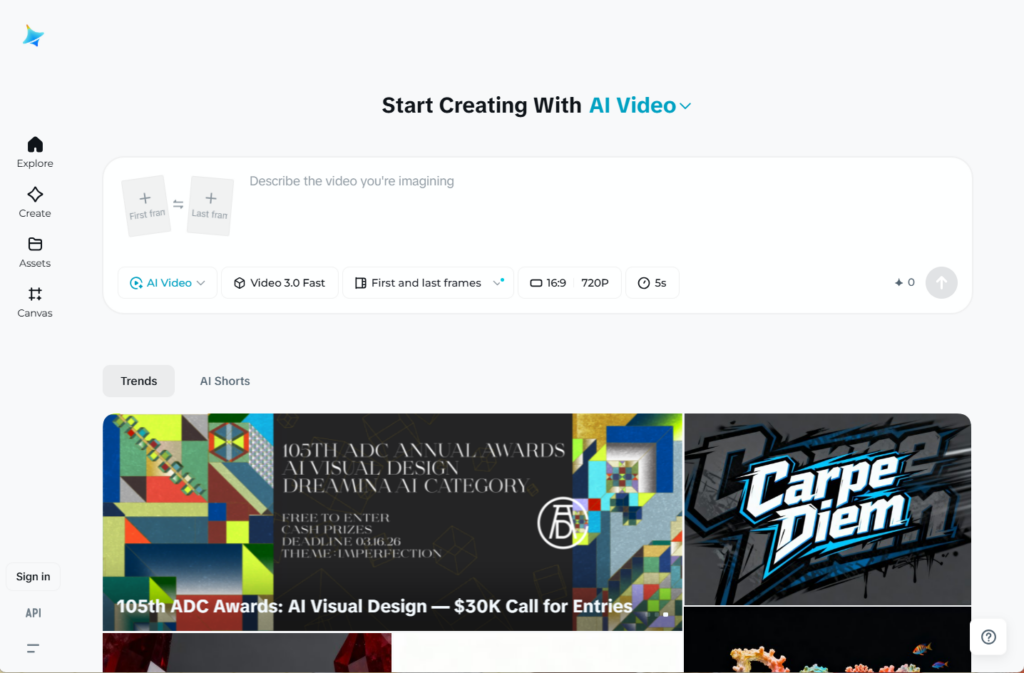
Method 1: Dreamina Official Platform
Access dreamina.capcut.com, select AI Video, and choose Seedance 2.0. Upload reference materials (images, videos, audio), write your text prompt using @ mentions to reference files, configure settings (aspect ratio, resolution, duration), and generate your video.
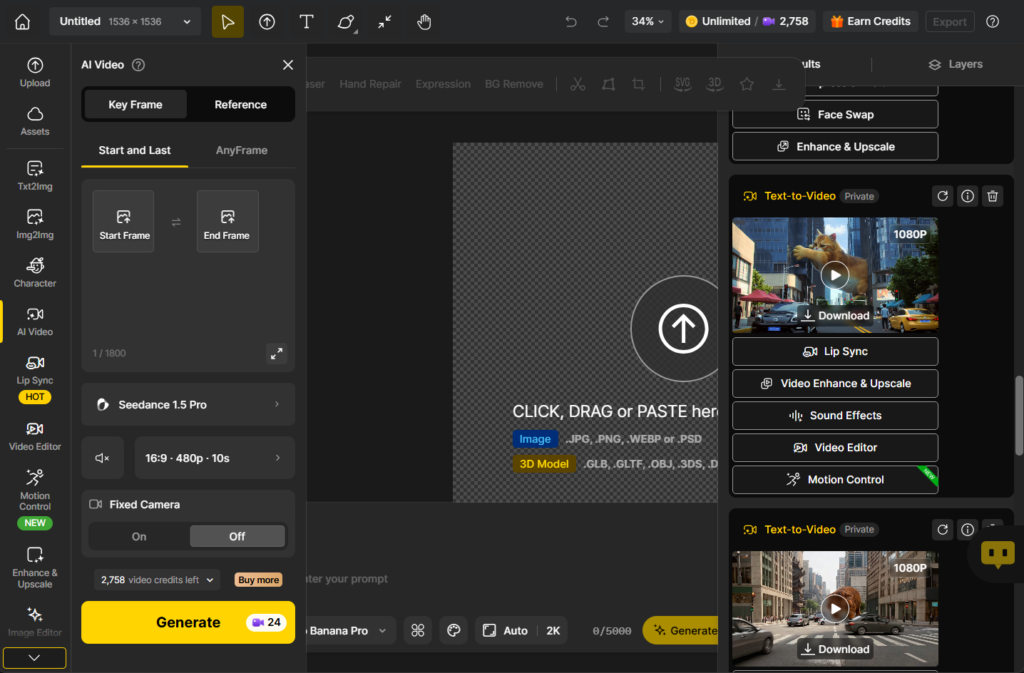
Method 2: Dzine Platform
Visit dzine.ai, access the AI Video tool, upload start/end frames images or reference images, describe your vision, select Seedance 2.0, configure output settings, and click Generate.
| What You Want to Do | How to Write the Prompt |
| Have a cover image and want to reference video actions | “@Image 1 as cover, refer to @Video 1’s punching action” |
| Extend an existing video | “Extend @Video 1 by 5s” (also select 5s for generation duration) |
| Merge multiple videos | “Add a transition scene between @Video 1 and @Video 2, content is xxx” |
| Use audio from a video | No need to upload audio separately, just reference the video directly |
| Continuous action | “The character jumps directly over the somersault, maintaining the motion yellow streamers” |
Pricing Comparison
| Platform | Pricing Model | Cost Per Video (10s) | Subscription Options | Best For |
| Dreamina | Credit-based | $1.91 – $4.60 | Credits packages, annual discounts | ByteDance ecosystem users, integrated workflow needs |
| Dzine | Subscription + credits | Lower cost for volume | Flat-rate monthly plans with generous quotas | High-volume creators, multi-model access needs |
Key Differences:
Dreamina Advantages:
- Comprehensive ByteDance ecosystem integration.
- Seamless workflow with Seedream 5.0, AI Agent, and AI Avatar.
- Official platform with guaranteed feature updates.
- Direct access to all Pro features.
Dzine Advantages:
- More economical pricing for regular users producing multiple videos monthly.
- Access to multiple AI models (video and image generation) such as Kling 3.0, Hailuo 2.3, Seedream 5.0, etc., within one subscription.
- Flat-rate subscription is more cost-effective than pay-per-generation.
- Streamlined interface for managing multiple projects.
- Competitive processing speeds with reliable uptime.
For creators producing dozens of videos monthly, Dzine’s pricing structure typically offers better value, while Dreamina suits those needing full ecosystem integration.
Use Cases and Applications
Social Media Content Creation: Generate consistent short videos for TikTok, Instagram Reels, and YouTube Shorts. Maintain brand consistency using the same character images and style references across posts. The 9:16 vertical format support and consistency features solve character drift problems in serial content.
Marketing and Advertising: Produce product demonstrations and promotional content while preserving logos, packaging, color grading, and brand identity. Generate multiple variations for A/B testing efficiently. Frame-level consistency ensures accurate brand colors and crisp logos without distortion.
Film Pre-Visualization: Transform storyboards into cinematic previews with accurate motion and lighting. Directors visualize shots and plan camera paths before full production. Game developers create cinematic trailers from concept art, demonstrating complex sequences cost-effectively.
Educational Content: Create engaging tutorial videos and instructional materials. Generate step-by-step demonstrations with smooth animated transitions. Visualize abstract concepts with diagrams and reference animations, pairing explanations with synchronized sound effects.
Music Videos: Create videos where visuals sync perfectly with beats and musical dynamics using audio reference capabilities. Generate complex narrative music videos with multiple coherent scenes, democratizing production for independent artists.
Seedance 2.0 Alternatives
The following is a quick chart about Seedance 2.0 alternatives for you. You can quick checj Seedance 2.0 vs Kling 3.0 vs Sora 2 vs Veo 3.1.
| Feature | Seedance 2.0 | Kling 3.0 | Sora 2 | Veo 3.1 |
| Developer | ByteDance | Kuaishou | OpenAI | |
| Max Duration | 4-15s | Up to 15s | Up to 20s | 4-8s (extendable) |
| Resolution | 2K | 1080P | 1080P | 4K |
| Multimodal Input | Images/Video/Audio/Text | Text/Image/Video | Images/Text | Images/Text |
| Audio Reference | ✓ | ✗ | ✗ | ✗ |
| Motion Control | Camera replication | Motion brush | Physics simulation | Cinematic control |
| Best For | Reference-based work | Natural motion, budget | Physical realism | Cinematic quality |
| Pricing | $1.91-$4.60/clip | Most affordable | $0.10-$0.50/s | ~$0.75/s |
Choose Seedance 2.0 for reference-heavy projects, audio-synchronized content, and template-based creation. Unique @ reference system and audio capabilities make it ideal for music videos and brand-consistent content.
Choose Kling 3.0 for smooth, natural motion, budget-conscious high-volume production, and quick concept visualization with the innovative motion brush feature.
Choose Sora 2 when physical accuracy is paramount, for narrative content with dialogue, or when realistic physics and character consistency are critical.
Choose Veo 3.1 for broadcast-ready quality, professional B-roll, and content requiring cinema-standard polish and color grading.
Conclusion
Seedance 2.0 represents a breakthrough in AI video generation with its unique multimodal approach, allowing creators to combine images, videos, audio, and text for unprecedented creative control. Whether you choose Dreamina for ecosystem integration or Dzine for cost-effective volume production, Seedance 2.0’s enhanced reference capabilities, improved consistency, and flexible editing features make it an essential tool for modern content creators seeking professional-quality AI-generated videos.